


GolfbaysUSA
Lux Golf Simulator Hitting Enclosure
Lux Golf Simulator Hitting Enclosure
Couldn't load pickup availability
Share


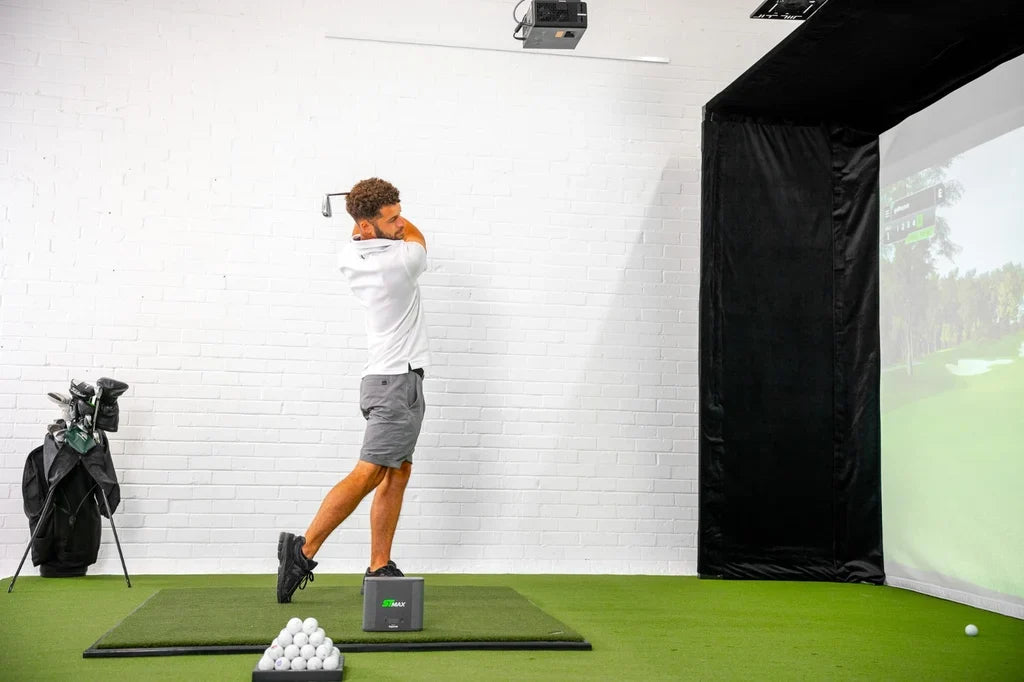
Lux Golf Simulator Hitting Enclosure
Create a dedicated indoor golf experience with the Lux Golf Simulator Hitting Enclosure. Designed for home golf studios and commercial simulator facilities, this premium enclosure combines a heavy-duty aluminum box-section frame with a velour surround, creating a polished setting for indoor golf practice and simulator play.
At the center of the enclosure is a 4K Pro+ white impact screen, designed to accommodate golf-ball impacts while providing a projection surface for simulator visuals. A base tension wire helps maintain the screen's position, while an adjustable projector arm and universal launch monitor bracket provide flexible equipment mounting options.
Available in four sizes, the GolfBays Lux enclosure lets you choose a configuration that fits your indoor golf space. Whether you're developing a personal golf room or outfitting a commercial facility, its integrated screen, frame, and mounting components provide a practical foundation for your golf simulator setup.
Key Features
Heavy-Duty Aluminum Frame: Features a sturdy aluminum box-section frame designed for residential and commercial indoor golf environments.
4K Pro+ Impact Screen: Includes a white golf simulator impact screen designed for golf-ball contact and high-resolution projected imagery.
Premium Velour Surround: The heavy-duty velour surround frames the impact screen and creates a clean, finished appearance.
Screen Tension System: A tension wire positioned along the base helps maintain the screen's shape and positioning.
Adjustable Projector Mount: Includes an adjustable projector arm mounting kit for positioning a compatible projector within your simulator setup.
Universal Launch Monitor Bracket: Provides a mounting option for a range of launch monitors, subject to individual equipment compatibility.
Foam Protection Wedge: Includes a foam protection wedge as part of the enclosure components.
Four Size Options: Available in four configurations to accommodate different indoor golf room layouts.
Product Specifications
Brand: GolfBays
Model: Lux
Product Type: Golf Simulator Hitting Enclosure
Primary Application: Indoor Golf Simulation
Intended Settings: Residential and Commercial
Frame Material: Heavy-Duty Aluminum Box-Section
Surround Material: Heavy-Duty Velour
Impact Screen: GolfBays 4K Pro+ White Impact Screen
Screen Support: Base Tension Wire
Projector Mounting: Adjustable Projector Arm Mounting Kit
Launch Monitor Mounting: Universal Launch Monitor Bracket
Available Sizes: Four
Dimensions
The GolfBays Lux Golf Simulator Hitting Enclosure is available in four sizes. Dimensions are listed as width × height × depth.
Size 1: 9 ft 2 in × 8 ft 8 in × 4 ft 11 in
Size 2: 10 ft 10 in × 8 ft 8 in × 4 ft 11 in
Size 3: 12 ft 6 in × 9 ft 4 in × 5 ft 11 in
Size 4: 14 ft 9 in × 9 ft 8 in × 7 ft 7 in
Space Planning: These measurements describe the enclosure dimensions. You need additional room for the golfer's stance, full swing, equipment positioning, and clearance around the enclosure.
What's Included
Enclosure Frame: Heavy-duty aluminum box-section frame.
Surround: Premium heavy-duty velour surround.
Impact Screen: GolfBays 4K Pro+ white impact screen.
Screen Accessories: Base tension wire and bungee attachments.
Launch Monitor Mount: Universal launch monitor bracket.
Projector Mount: Adjustable projector arm mounting kit.
Additional Protection: Foam protection wedge.
Installation and Compatibility
Indoor Installation: The GolfBays Lux is designed for indoor golf simulator environments, including home golf rooms and commercial facilities.
Room Requirements: Verify your available floor space, ceiling height, and swing clearance before selecting an enclosure size. Allow approximately 12 inches (30 cm) of clearance behind the impact screen so the material has room to move when struck.
Projector Compatibility: The adjustable projector arm provides a mounting option for compatible equipment. Confirm your projector's mounting requirements and throw distance before installation.
Launch Monitor Compatibility: The universal launch monitor bracket accommodates a range of devices. Check the mounting requirements of your specific launch monitor.
Additional Equipment Required: A projector, launch monitor, hitting mat, and compatible simulator computer or tablet are sold separately.
Care and Maintenance
Impact Screen Care: Use clean golf balls and clubs to help minimize dirt transfer and unnecessary wear on the impact screen.
Screen Maintenance: Inspect the impact screen periodically for signs of wear. Like other golf impact screens, the material experiences wear during regular use and may eventually require replacement.
Equipment Positioning: Maintain appropriate clearance around the enclosure and ensure the hitting area provides adequate space for unrestricted golf swings.
Warranty
Manufacturer Warranty: The GolfBays Lux Golf Simulator Hitting Enclosure includes a 1-year manufacturer warranty.
Frequently Asked Questions
Does the GolfBays Lux Golf Simulator Hitting Enclosure include an impact screen?
Yes. The GolfBays Lux includes a 4K Pro+ white impact screen designed for golf-ball impacts and projected golf simulator imagery.
What sizes are available for the GolfBays Lux enclosure?
The enclosure is available in four sizes, ranging from 9 ft 2 in wide × 8 ft 8 in high × 4 ft 11 in deep to 14 ft 9 in wide × 9 ft 8 in high × 7 ft 7 in deep. Select the size that accommodates your room dimensions while allowing sufficient space for swinging and equipment placement.
Are a projector and launch monitor included with the GolfBays Lux enclosure?
No. The enclosure includes an adjustable projector arm mounting kit and a universal launch monitor bracket, but the projector and launch monitor are sold separately. A hitting mat and compatible simulator computer or tablet are also separate purchases.
How much room is needed to install the GolfBays Lux enclosure?
Space requirements depend on the enclosure size and the equipment you plan to use. Your room must accommodate the selected frame dimensions, approximately 12 inches (30 cm) of clearance behind the impact screen, and adequate space for the golfer's stance and full swing. Verify ceiling clearance and equipment positioning before installation.
Does the GolfBays Lux Golf Simulator Hitting Enclosure come with a warranty?
Yes. The Lux enclosure includes a 1-year manufacturer's warranty.